Game Music
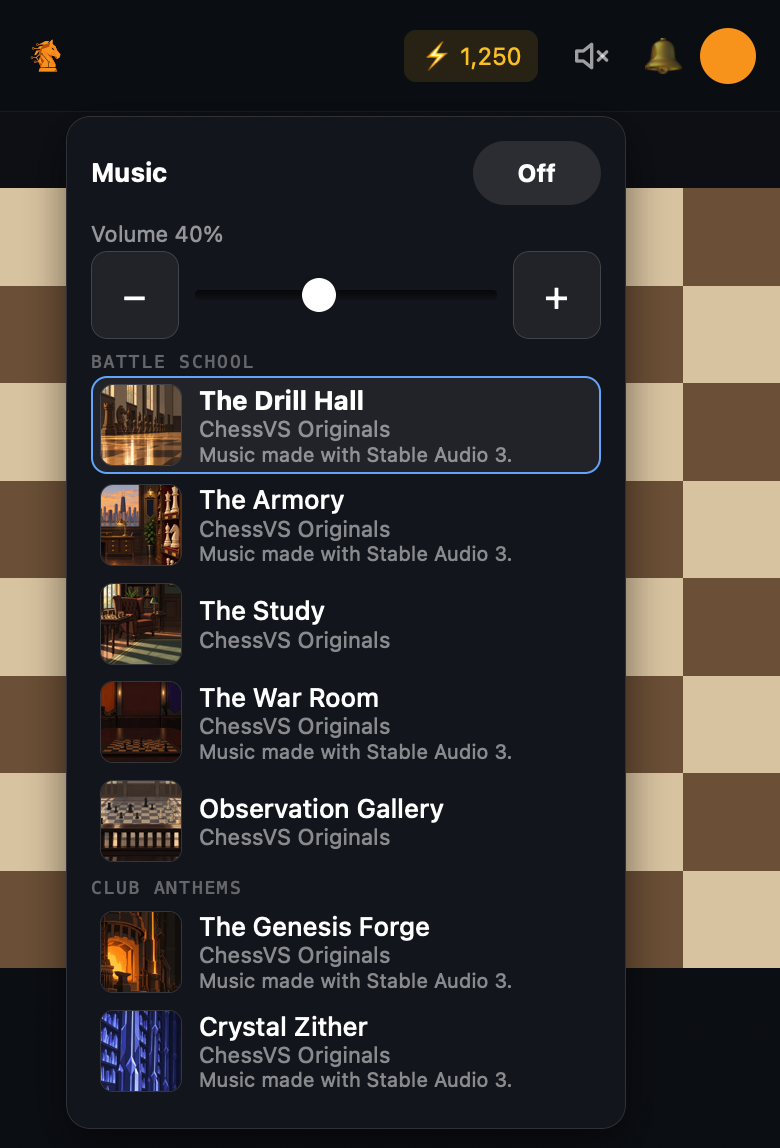
ChessVS has its own music: seven tracks made for the game.
- Battle School: The Drill Hall, The Armory, The Study, The War Room, Observation Gallery
- Club anthems: The Genesis Forge for Bitcoinia, Crystal Zither for Etheryst
Turning it on
Music starts off. Tap the speaker icon to turn it on, and tap it again to turn it off. The icon sits in the top bar, and on the match screen during a game. The first time you turn music on, the music panel opens so you can set the volume.
Volume and tracks
Press and hold the speaker icon to open the panel. Set the volume with − and +, and pick a track from the list, each with its own cover. When a new track starts, its name shows beside the icon for a few seconds. Music keeps playing from the lobby into your match and back, and your choice, volume and track are remembered on this device.
The anthem sting
When the VS screen opens a match and your music is on, a short cut of your club's anthem plays as the VS badge lands. The track goes quiet for it, then comes back.
Credits
All seven tracks are ChessVS Originals, made for ChessVS with AI tools. Five were made with Stable Audio 3, and the panel says so under those tracks.