Starting a Match
A match only works when both players show up. These rules make sure you know the moment your match is ready, and keep a game from hanging when a player never makes a move.
They apply to Quick, Casual and Ranked games and to friend challenges. Tournament games keep their own rules, and practice games against the AI, Sparring Room lessons, Battle School, Sovereign Duels and Grudge Match rematches don't use them.
The VS screen and the red clock work in more games, and each part says where.
Match found!
If you're in another tab or window when your match is found, the browser tab's title flashes Match found! and a short chime plays, so you can get back in time. The title goes back to normal as soon as you return to the tab. If you're already looking at the game, there's no chime.
If your device is set to reduce motion, the title changes once instead of flashing.
The VS screen
When a new game starts, a VS screen fills the screen for about three seconds before the board appears. White is on the left and Black on the right, split by a slanted, glowing line with a VS badge in the middle. Your half says YOU. The other says OPPONENT, or AI in a practice game.
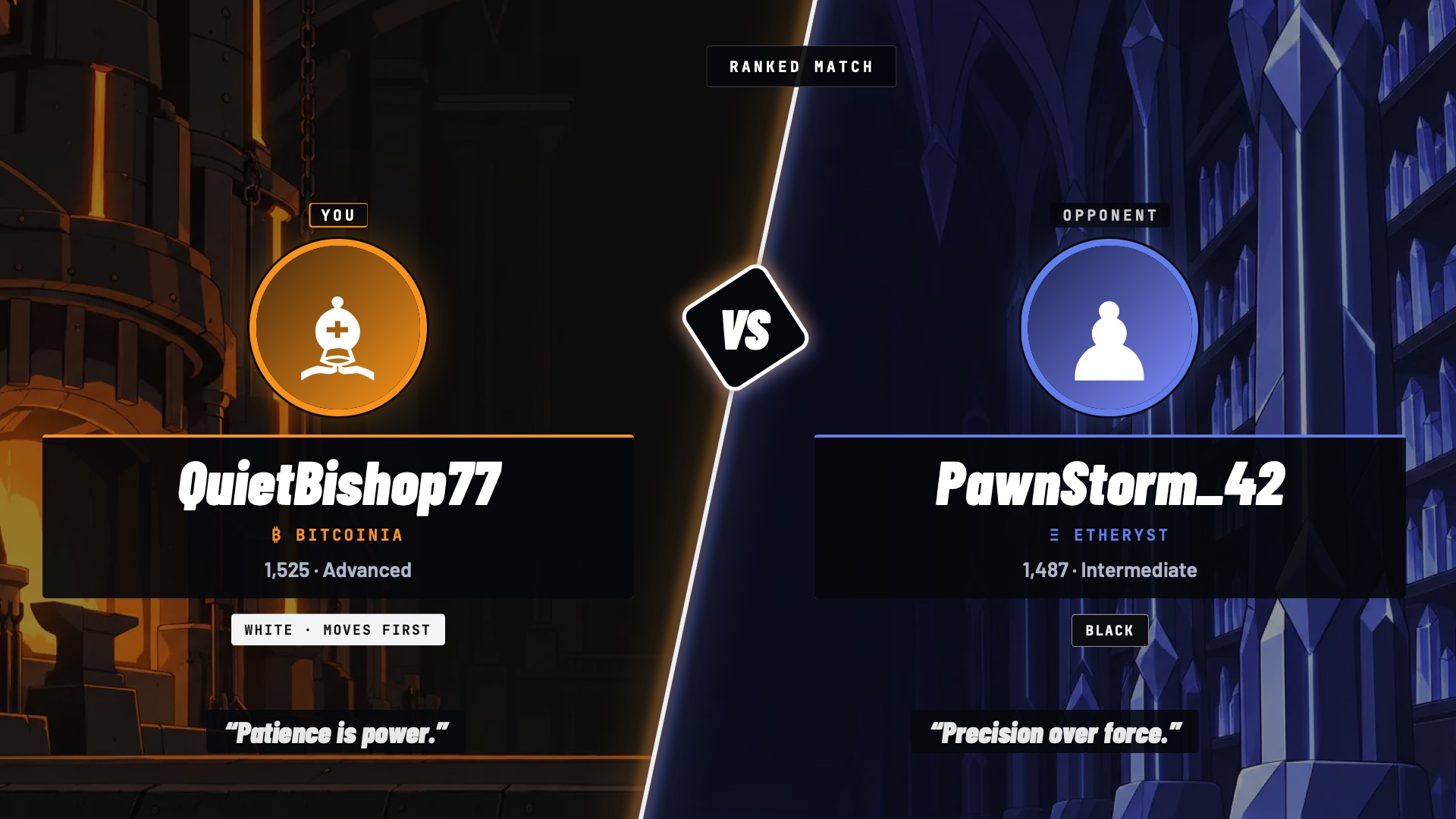
Each half shows that player's club art, profile picture, name, rating, club and motto. If you've turned club art off, each half is a plain panel in its club's color. A rating shows the number and its tier, like 1,525 · Advanced. The AI's half says AI practice partner. The card also names the game, like RANKED MATCH or DUEL.
Your clock doesn't run during it. The clocks and the 30-second first move wait until the board appears.
If your music is on, a short cut of your club's anthem plays as the VS badge lands. If your device is set to reduce motion, the VS screen fades in and out instead of sliding.
You see it in Quick, Casual, Ranked and tournament games, Sovereign Duels, friend challenges, Grudge Match rematches and practice games against the AI. You don't see it in the Sparring Room, when you come back to a game that's already under way, or when you watch someone else's game.
Your first move: 30 seconds
When a game starts, White has 30 seconds to make the first move. Once White has moved, Black has 30 seconds to make theirs.
While the game waits, a countdown bubble sits on the bar of the player who has to move. On your own bar it reads Your first move: 30s, and on your opponent's bar it reads Their first move: 30s, counting down to zero.
Once both first moves are in, the countdown is gone and the game plays on your normal clocks.
Abandoned games
If a player doesn't make their first move in time, the game ends as Abandoned. Nobody wins and nobody loses:
- No rating change for either player.
- No XP and no FOCUS.
- It doesn't count as a win or a loss, and it doesn't count toward your quests.
Your results screen shows Abandoned and says who didn't move: You didn’t make a first move · No rating change or Opponent didn’t make a first move · No rating change.
If you're the one who showed up, nothing happens to you. Just queue again.
In Quick, Casual and Ranked, the player who didn't move is marked as an early leaver. A friend challenge never leaves a mark.
Disconnects. If the player whose first move it is disconnects and doesn't come back in time, the game is Abandoned the same way. The player who stayed is never charged.
Idle
After the first moves, nothing ends a game early. But if your opponent goes a full minute on their turn without moving, their bar shows Idle, with a bubble that reads No move for a minute. The bubble fades after a short while, and the Idle label stays until they move.
Idle is only a notice, and only you see it. Their clock keeps running and still decides the game.
The last minute
In any game on the clock, a running clock that drops under a minute turns red and glows softly. Under 30 seconds it pulses as well. A clock that isn't running never glows, so the warning is always on the clock that's ticking. If your device is set to reduce motion, the clock stays red without the pulse.